
When you finishing with choosing the best products for your grower, you save the recommendation in the list of solutions you created for this organization and season.
- Click Seed Solution icon. List of available Seed Solutions under the selected organization and season will be displayed.

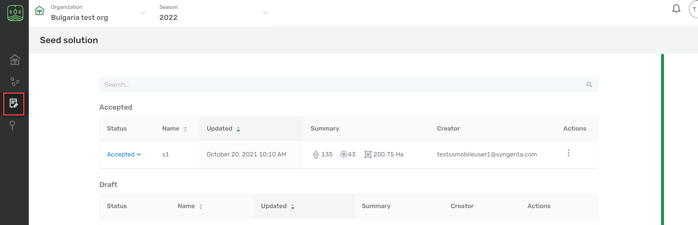
This page displays the Seed solutions you’ve created for different crops for the selected Organization.
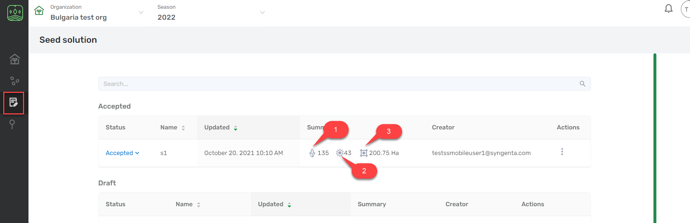
Callout |
Description |
|
Indicates the number of bags required for the crop Corn. |
|
Indicates the number of bags required for the crop Sunflower. |
|
Indicates the area in hectares of the field. |


If you navigate to the Actions tab and click the three dots icon, system will displays the below pop-up:
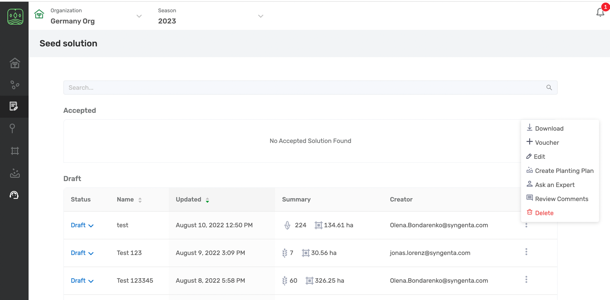
Tab name |
Definition |
Download |
Enables the user to download PDF of the recommendation. |
Voucher |
Enables the user to create opportunity for Formyoula. |
Create Planting Plan |
This button will navigate you to Planting Plan module |
Edit |
Enables the user to add changes to the saved solution. |
Delete |
Enables the user to delete the saved solution. |
Ask an expert |
Enables the user to send the solution for review to the crop expert. |
Review comments |
You will be able to review the messages left for you by Crop Expert |
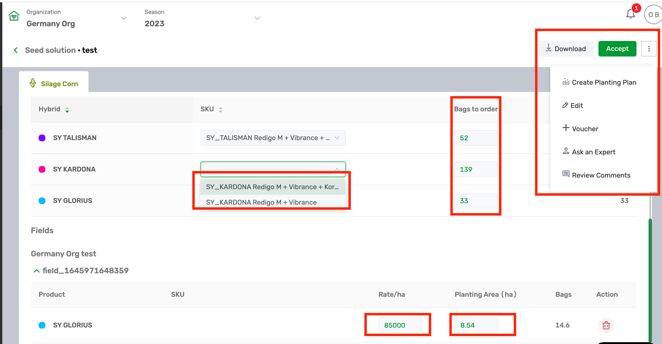
Choose the solution name you need and open it to see more details:
- In the Solution View you can perform the same actions with it as described above, change number of bags (which were calculated according to bag size and seed rate).
- Change the Seed rate for each field and size of the field's plating area.
-
Read other articles to see what actions you can perform with the created solutions.
Comments
0 comments
Article is closed for comments.