
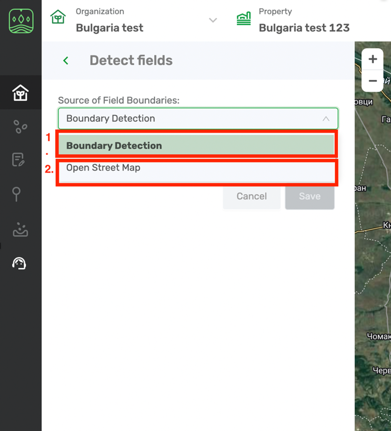
Field boundaries can be detected by several algorithms:
- Cropwise Operations algorithm = “Boundary detection” in the drop down list. This function is most efficient in Ukraine and Russia.
- OpenStreetMaps - boundaries will upload from free editable geographic database
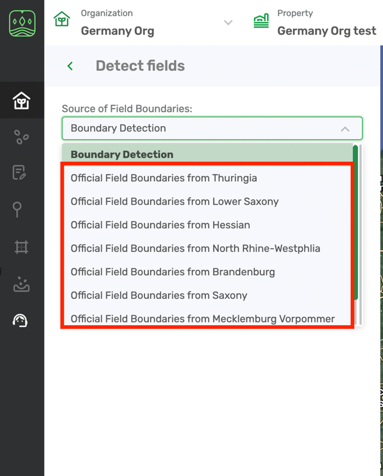
In Germany we use Official boundary register (most precise; for now available only for several areas in Germany).
Seed Selector allows detecting fields automatically on the map. All you need is to select the fields you want to assign to your farm or make some edits if required.
- You’ll find a set of fields detected on the map for the selected property.
- Select the fields that belong to your farm on the map and click Save.
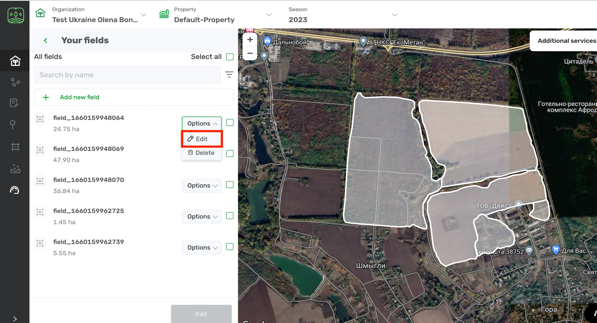
- Once they are uploaded you can edit them. As you will get the list of fields, click on options and choose Edit.
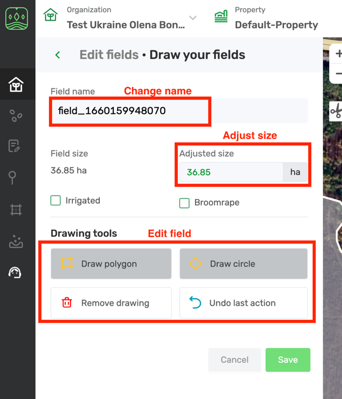
- You will be navigated to the Edit field menu. There you can change their names or size information or edit boundaries. More on how to edit field you can read in the article Draw your fields.
Remark: User can create properties only in the same country where the related organization is located.
Once you’re done with editing field click Save and you can go to create recommendation in Seed Selector module.
Comments
0 comments
Article is closed for comments.