
You can get a clear view of all farm accounts and organizations assigned to you with a map for your farm locations. Seed Selector keeps all organizations data in perfect sync with your Salesforce account, so you can jumpstart with field mapping.
- Click Manage Organizations. You’ll find your customers addresses pinned on the map and on a list of all your organizations.

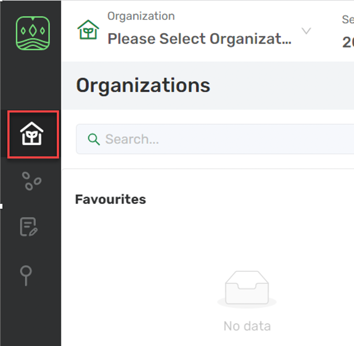
There are many ways to quickly find any organization you’re looking for:
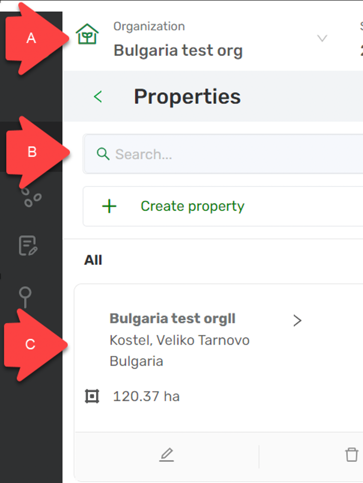
A. Organization list: Tap the Organization list on the top to get to the farm account you want.
B. Search: If you have a specific organization in mind, you can filter the list by typing a name of a farm in the top search field.
C. Favorites: Star your favorite organizations to keep them on top for quick access. Starred organizations appear in your Favorites list. To remove an organization from your favorites, click the star icon next to the organization to unstar.
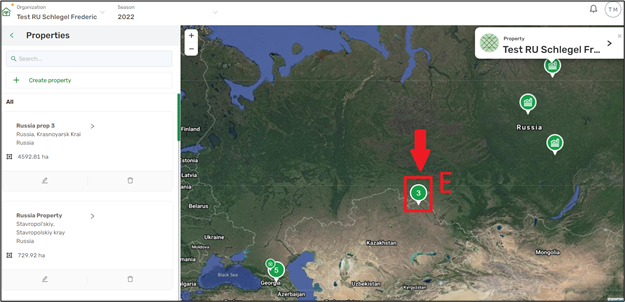
D. Find on map: Click on map pins to find your farms per region or location. You can also navigate the map to explore nearby farms.
E. Grouping functionality: The number represents multiple organizations in the area and users need to zoom into the map to view the details.
Comments
0 comments
Article is closed for comments.